デザイナーでもプログラマーでなくても素早くブラウザで確認できます.


自分が決めた配色のイメージを簡単に右上のアイコンリンクで他人に伝えることができます.
あとは, 開発者向けに一括で出力できたらなあ.




デザイナーでもプログラマーでなくても素早くブラウザで確認できます.
自分が決めた配色のイメージを簡単に右上のアイコンリンクで他人に伝えることができます.
あとは, 開発者向けに一括で出力できたらなあ.
MaterialDesign な ActionBar に実装されているメニューアイコンを長押ししたら表示される 吹き出しチックな Toast.
これ.

例えば, レイアウトがこんな感じであるとして,
...
<TextView
    android:id="@+id/text"
    android:layout_width="wrap_content"
    android:layout_height="wrap_content"
    android:longClickable="true"
    android:text="Hello World!"
    android:contentDescription="コンニチハ セカイ!!"
    />
...
<android.support.design.widget.FloatingActionButton
    android:id="@+id/fab"
    android:layout_width="wrap_content"
    android:layout_height="wrap_content"
    android:layout_gravity="bottom|end"
    android:layout_margin="@dimen/fab_margin"
    android:src="@android:drawable/ic_dialog_email"/>
...
リスナーと表示するテキストは以下のようにシンプルにセットするのみ.
...
TextView text = (TextView)findViewById(R.id.text);
FloatingActionButton fab = (FloatingActionButton) findViewById(R.id.fab);

CheatSheet.setup(text);
CheatSheet.setup(fab, "メールボタンを長押ししました!!");
...
それぞれ長押しで表示.


これ.
Android helper class for showing cheat sheets (tooltips) for icon-only UI elements on long-press. This is already default platform behavior for icon-only action bar items and tabs. This class provides this behavior for any other such UI element.
https://gist.github.com/romannurik/3982005
ポータブルにリスナー設置や適切なToast位置の指定や上下の振り分けができます.
すべては, 以下にあるやつ今現在最新のサンプルUI系をLollipopで動かす.

AndroidStudio の ImportSample のプレビューが表示されないので並べて置くと何かと便利かななどと思い.

パーツやふるまいの名前が分かればそれで良かったのでYouTubeのGIF書き出しでやろうかと思いましたが, 一般公開間近の非公開ステータス.

Nexus6でやってます.
こんな感じで40個くらい.
以下から順不同で.

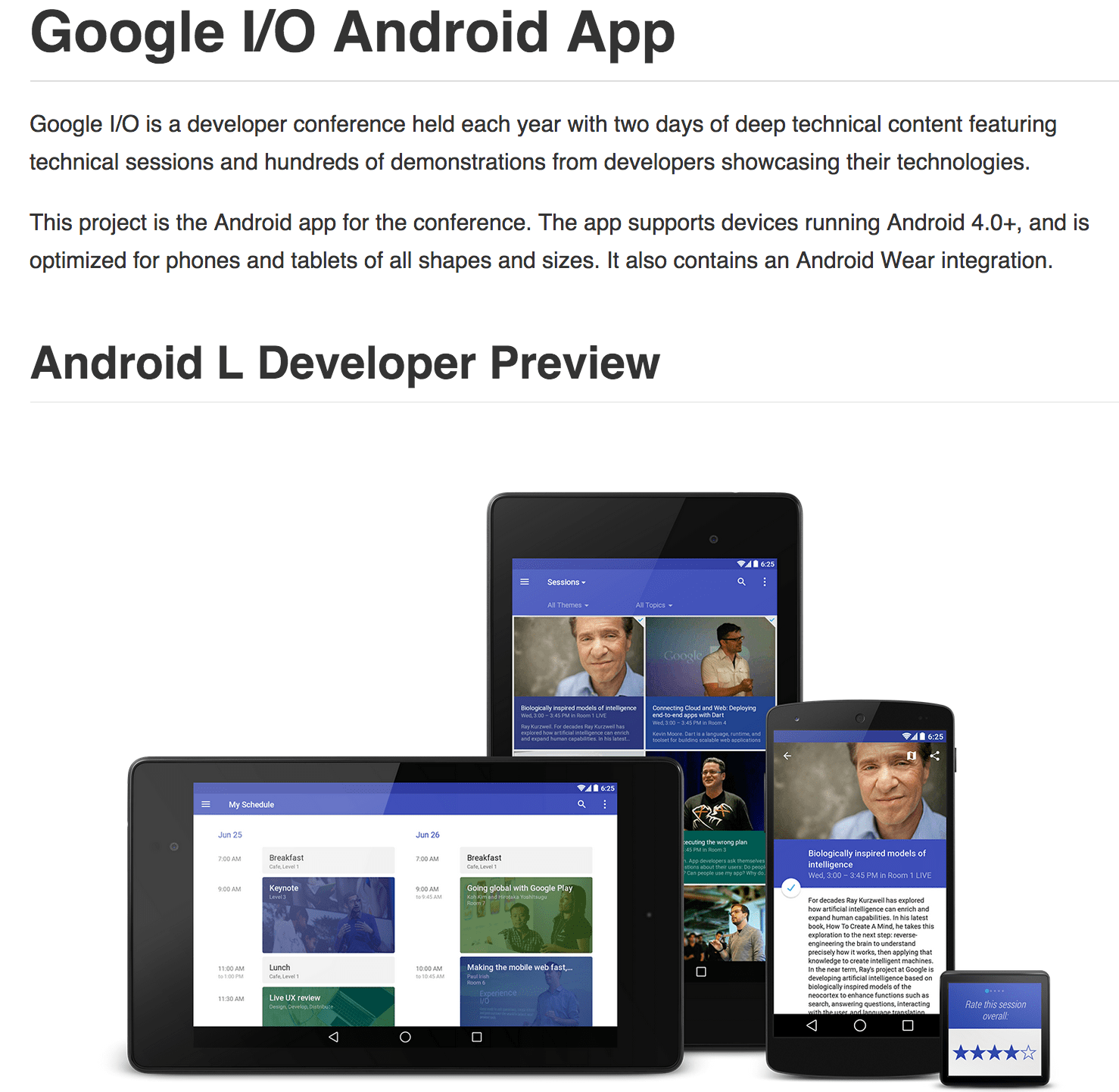
毎年ソースコード公開していますが, 勉強になります, これ.
どんな機能があるかを汎用的にまとめると
・ edit your personal schedule
・ Sync your schedule between all of your devices and website
・ View detailed Google+ profiles
・ +1 sessions right from the app
・ Participate in conversations on Google+
・ using the vector-based map
・ Get a reminder in your schedule are due to start
・ View information in the Developer Sandbox
・ Play live video streams
・ Beam from your NFC-enabled device to another using Android Beam
・ Scan on your NFC-enabled device
・ Send feedback from your phone/tablet, or from your Android Wear device
ビルド時の説明も細かくあります.

Building without Android Wear
If you do not wish to build the Android Wear component, you can remove or comment out the following line on android/build.gradle:wearApp project(":Wearable")
Also, remove ':Wearable' from settings.gradle, leaving only ':android'.
iosched/BUILDING.md at master · google/iosched
確認する価値はあると思われます.
Google announced in a blog post that it has released the source code to the…
Google I/O 2014 App Source Code Now Available | Android Developers Blog
なんか画像はあちこちのサイトで見かけるものの.
体感としてどうなのか.
なんか 3D気味に作ることを推奨していた2D時代に逆戻りのように思ったりしましたが.
こんなかんじになりました.


キャプチャーでみるよりも,
季節柄なのかスッキリしていいかんじです.
シンプルかつ斬新的な感じがします.
設定画面などデフォルト系のテーマを使っている画面などは,
非対応なアプリでもきっとそのまま引き継げるんですね.


Material Theme | Android Developers
以下のアプリを使いました. Cyanogenmod向け.
Android L - CM 11 Theme - Google Play の Android アプリ
その他, ブート画面とか, 通知音も変わります.
すべてクールで良い感じです.
[CM11][NEW ENGINE] Android L 1.9.1 - 20/7/20… | Android | XDA Forum