えっ, こんな時代になってきてるのかよっ.

https://twitter.com/little1027_PS4/status/496522507315200000
よくみると, 完全に合成すぎる(笑)
調べてしまったけど.

まじで, 日本終了かと一瞬思いました.




えっ, こんな時代になってきてるのかよっ.
https://twitter.com/little1027_PS4/status/496522507315200000
よくみると, 完全に合成すぎる(笑)
調べてしまったけど.
まじで, 日本終了かと一瞬思いました.
Wear とか 新機種とか, ハード系の話題が多めなAndroidですが.
Android端末のイヤホンジャックに差し込むだけで、お気に入りのアプリを起動したり写真を撮影したりなど好きなアクションを設定できる「自分だけのオリジナル物理ボタン」を作り出せるハードウェア「iKey」です。
Androidスマホのイヤホンジャックに取り付ける物理ボタン「iKey」が超絶便利 - GIGAZINE
多少のレスポンスを犠牲にしても、手頃に購入できる方が受けは良いのではないかと思います。
ただし、「PRESSY」は連続長押しの組み合わせが設定できるので、登録できる動作の数は圧倒的です。(そこまでの数を登録する方がいるのか不明ですが)さらに、色々試していると「iKey」は「PRESSY」アプリでも動作する事が分かりました。正確に言うと「i-click」が「PRESSY」アプリで動作しない以外、どの組み合わせでもOKです。(※)
皆さんは買うならどれにしますか?個人的には「iKey」が一番良いと感じました。
スマホのイヤホンジャックに物理ボタンを!話題のPRESSY、iKey、i-clickを比較してみた!
買おうかなと思いつつ, Amazon へ.

500百円くらいなら買おうかなあ, とか思ったけど, その時挿してたヘッドホンはどうしてるの?
挿し替え? それもなんか面倒だな, 小さいからなくなっちゃいそうだし.
あー, こんなのあるのか.


そーいえば, ヘッドホンにもボタンあったよなあ, などと思ったり.
音楽プレーヤーの操作ができるのは
知っていましたが、その他結構いろんな操作ができたりします。

驚愕!! Android付属のヘッドセットボタンひとつでできる操作が多量すぐる件
あれこれ見ていると, ikey って $0.99 で海外では売られてたりしてるの?

iKey Press Button $0.99 (Like Pressy) | LG G2 | XDA Forum

Original ikey Press Button Slim & Smart Shortcut Customized Cool Gadget for Android Devices - Tmart
送料とかあるのかな?...
いや, アキバで買ったほうがいいのか...
いや, 電車代を含めると...
...
まあどっちでもいいか (笑)
トッパン・フォームズ株式会は、NFC対応のスマホやタブレットによるICチップ入り運転免許証の真贋判定を行うアプリを開発しました。この新システムは国内初のとりくみ。今年3月に発表した「ファストショット」の新機能として、8月よりリリース予定です。
使い方は簡単。アプリを立ち上げ個人情報を入力してから、ICチップ部分をスマホにかざすだけです。すると、スマホがICチップに登録されている顔写真情報や氏名、などの個人情報を取得。事前に入力したものとICチップで取得したものをサーバー内で照合することにより、真贋判定を行うという仕組みです。
スマホで運転免許証の真贋判定ができるようになりました : ギズモード・ジャパン
「真偽」でなくて「真贋」てなんだ?
しん‐がん 【真×贋】
本物と、偽物。また、本物か偽物かということ。「―を見分ける目」
アプリをインストールしてみます.
あ...
ない...
(2014-08-02 18:20現在)


fastshot - Google Play の Android アプリ
「8月」ということなので, もう出るんぢゃないかと...
しばらく待ちです. 楽しみです.
(リリースされたら使ってみます!)
国内初、スマホ・タブレットで運転免許証の真贋判定を実現 NFCリーダー・ライターで運転免許証のICチップを読み取り、認証|ニュースリリース:2014年|トッパン・フォームズ株式会社
運転免許証と印影の同時撮影によりスマートフォンだけで口座開設申し込みが完了 - 新生銀行が日本で初めて印影の電子的取得を開始 -|ニュースリリース:2014年|トッパン・フォームズ株式会社

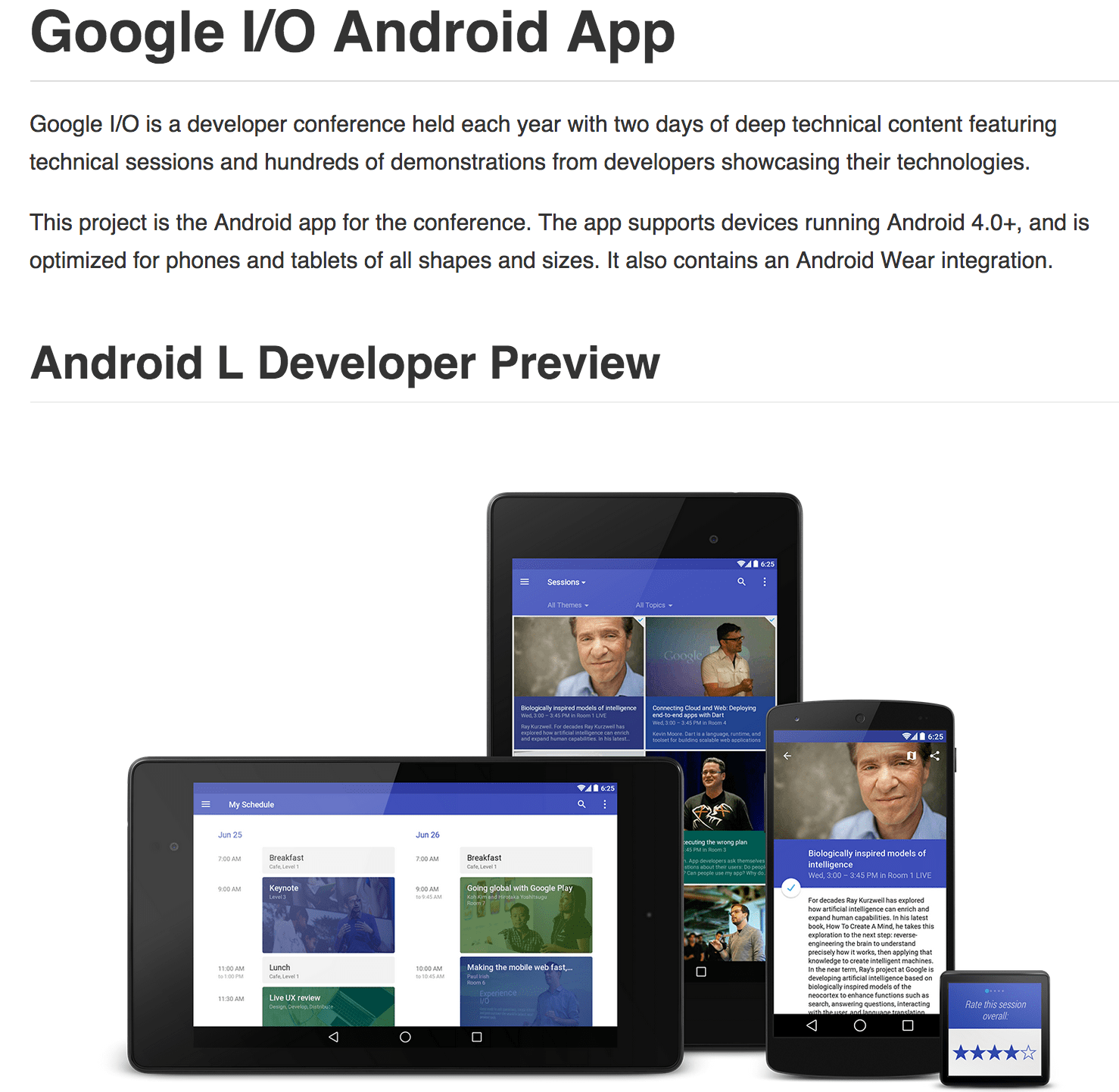
毎年ソースコード公開していますが, 勉強になります, これ.
どんな機能があるかを汎用的にまとめると
・ edit your personal schedule
・ Sync your schedule between all of your devices and website
・ View detailed Google+ profiles
・ +1 sessions right from the app
・ Participate in conversations on Google+
・ using the vector-based map
・ Get a reminder in your schedule are due to start
・ View information in the Developer Sandbox
・ Play live video streams
・ Beam from your NFC-enabled device to another using Android Beam
・ Scan on your NFC-enabled device
・ Send feedback from your phone/tablet, or from your Android Wear device
ビルド時の説明も細かくあります.

Building without Android Wear
If you do not wish to build the Android Wear component, you can remove or comment out the following line on android/build.gradle:wearApp project(":Wearable")
Also, remove ':Wearable' from settings.gradle, leaving only ':android'.
iosched/BUILDING.md at master · google/iosched
確認する価値はあると思われます.
Google announced in a blog post that it has released the source code to the…
Google I/O 2014 App Source Code Now Available | Android Developers Blog
こんな人気記事あります.
2日で約3000語を暗記、スマフォ世代の英単語学習アプリ「mikan」はTinderライク - TechCrunch
mikanでは左右にスワイプすることで次々とカードをめくっていくようなUIを採用している。これは、去年あたりからアメリカの若者の間で流行している出会いアプリの「Tinder」が生み出し、多くのアプリが採用しているスマフォ・ネイティブといっていいUIだ。
「素早く振り分けができる」てことなのだろうが, Yes/No ボタンでも同じじゃね?
などと思いつつ, ライブラリを探す.
Swipeable-Cards/AndTinder at master · kikoso/Swipeable-Cards


使い方は簡単で,
レイアウト内に View コンテナとして埋め込んで,
<?xml version="1.0" encoding="utf-8"?>
<LinearLayout xmlns:android="http://schemas.android.com/apk/res/android"
              xmlns:app="http://schemas.android.com/apk/res-auto"
              android:layout_width="fill_parent"
              android:layout_height="fill_parent"
              android:orientation="vertical">

    <com.andtinder.view.CardContainer
        android:id="@+id/layoutview"
        android:layout_width="fill_parent"
        android:layout_height="0dp"
        android:layout_weight="1"/>
</LinearLayout>
利用 Activity でカード内のテキストと画像を指定.
スワイプ処理の Listener もここで.
public class MainActivity extends Activity {

  private CardContainer mCardContainer;

  @Override
  public void onCreate(Bundle savedInstanceState) {
    super.onCreate(savedInstanceState);
    requestWindowFeature(Window.FEATURE_NO_TITLE);
    setContentView(R.layout.mainlayout);

    mCardContainer = (CardContainer) findViewById(R.id.layoutview);

    Resources r = getResources();

    SimpleCardStackAdapter adapter = new SimpleCardStackAdapter(this);

    adapter.add(new CardModel("Title1", "Description goes here", r.getDrawable(R.drawable.picture1)));
    adapter.add(new CardModel("Title2", "Description goes here", r.getDrawable(R.drawable.picture2)));
    ...

    cardModel.setOnClickListener(new CardModel.OnClickListener() {
      @Override
      public void OnClickListener() {
        Log.i("Swipeable Cards","I am pressing the card");
      }
    });

    cardModel.setOnCardDimissedListener(new CardModel.OnCardDimissedListener() {
       @Override
       public void onLike() {
         Log.i("Swipeable Cards","I like the card");
       }

       @Override
       public void onDislike() {
         Log.i("Swipeable Cards","I dislike the card");
       }
    });

    adapter.add(cardModel);
    mCardContainer.setAdapter(adapter);
  }
}
このUI, 実際使ってみると, 気持ちよすぎてクセになるんだわー