android-apt で アノテーションを便利に

このプラグインを追加すると、gradle のソースフォルダとして認識される場所に Butter Knife で生成されるコードが格納されます。
そのため、Butter Knife で生成されたクラスも Lint から見えるようになり、Lint が怒らなくなります。やったー。

Y.A.M の 雑記帳: Butter Knife のフィールドやメソッドが Lint に Unused declaration と言われないようにする方法

JakeWharton commented on Sep 26
If you use the android-apt plugin then Android Studio can see the generated code and the method will not show up as unused.

Lint: Unused resource · Issue #356 · JakeWharton/butterknife

Bitbucket で公開されています.

The android-apt plugin assists in working with annotation processors in combination with Android Studio. It has two purposes:
Allow to configure a compile time only annotation processor as a dependency, not including the artifact in the final APK or library
Set up the source paths so that code that is generated from the annotation processor is correctly picked up by Android Studio.

hvisser / android-apt — Bitbucket

「APT」て何?

Annotation Processing Boilerplate Destruction (Droidcon NYC 2014) // Speaker Deck

Butter Knife 以外にも使えるのか.

わーい.


RecyclerView アイテム内ある要素の クリックイベント

いろんな実装が可能なのですが.


public class ItemsAdapter extends RecyclerView.Adapter<ItemsAdapter.ViewHolder> {

  // ...

  private static ItemsAdapter.OnItemClickListener listener;

  public void setOnItemClickListener(ItemsAdapter.OnItemClickListener listener) {
    ItemsAdapter.listener = listener;
  }

  public interface OnItemClickListener {
    void onItemClick(View view, int position);
  }

  // ...

  public static class ViewHolder extends RecyclerView.ViewHolder implements View.OnClickListener {

    public ViewHolder(final View itemView) {
      super(itemView);

      name = (TextView) itemView.findViewById(R.id.name);
      age = (TextView) itemView.findViewById(R.id.age);
      button = (Button) itemView.findViewById(R.id.button);

      name.setOnClickListener(this);
      age.setOnClickListener(this);
      button.setOnClickListener(this)
    }

    @Override
    public void onClick(View v) {
      if (listener != null) {
        listener.onItemClick(v, getLayoutPosition());
      }
    }

  }
}

UI.


public class MainFragment extends Fragment
    implements ItemsAdapter.OnItemClickListener {

  // ...

  @Override
  public View onCreateView(LayoutInflater inflater, ViewGroup container, Bundle savedInstanceState) {
   
    // ...
    mAdapter.setOnItemClickListener(this);
  }

  @Override
  public void onItemClick(View view, int position) {
    switch (view.getId()) {
      case R.id.name:
        // ...
        break;  
        // ...
  }

    // ...
}

ここらなんだろうな.

java - Why doesn't RecyclerView have onItemClickListener()? And how RecyclerView is different from Listview? - Stack Overflow


あのツールチップな長押しからの Toast を「CheatSheet」で

MaterialDesign な ActionBar に実装されているメニューアイコンを長押ししたら表示される 吹き出しチックな Toast.

これ.

20151104-081900

例えば, レイアウトがこんな感じであるとして,

...
<TextView
    android:id="@+id/text"
    android:layout_width="wrap_content"
    android:layout_height="wrap_content"
    android:longClickable="true"
    android:text="Hello World!"
    android:contentDescription="コンニチハ セカイ!!"
    />
...
<android.support.design.widget.FloatingActionButton
    android:id="@+id/fab"
    android:layout_width="wrap_content"
    android:layout_height="wrap_content"
    android:layout_gravity="bottom|end"
    android:layout_margin="@dimen/fab_margin"
    android:src="@android:drawable/ic_dialog_email"/>
...

リスナーと表示するテキストは以下のようにシンプルにセットするのみ.

...
TextView text = (TextView)findViewById(R.id.text);
FloatingActionButton fab = (FloatingActionButton) findViewById(R.id.fab);

CheatSheet.setup(text);
CheatSheet.setup(fab, "メールボタンを長押ししました!!");
...

それぞれ長押しで表示.

20151104-083151

20151104-083107

これ.

Android helper class for showing cheat sheets (tooltips) for icon-only UI elements on long-press. This is already default platform behavior for icon-only action bar items and tabs. This class provides this behavior for any other such UI element.

https://gist.github.com/romannurik/3982005

ポータブルにリスナー設置や適切なToast位置の指定や上下の振り分けができます.

ActionMenuItemView.java - Git at Google


最近の「Android System WebView」で追加されている機能

少しWebViewのまわりの挙動が変化している気がしたので調べてみた.

これ.

20151011-142959

AndroidシステムのWebView - Google Play の Android アプリ

Android 5.0 以降に対して, コンポーネントとしてのWebViewを切り離してPlayStoreで更新していくというもの.

このパッケージを入れている場合と入れてない場合の WebView にどれくらい差がでてきているのか.

Android 5.1 実機で簡単に機能を比べる.

…
mWebView = (WebView) findViewById(R.id.web_view);
mWebView.getSettings().setJavaScriptEnabled(true);
mWebView.loadUrl("https://html5test.com/");
…

HTML5test - How well does your browser support HTML5?

入れていない場合.

20151011-143135

入れている場合.

20151011-143336

10ポイント以上の差がある.

ポイントの大きなもの順に追加された機能をみる.

Service Workers (+10)

20151011-143539

Service Workers Nightly

Introduction to Service Worker: How to use Service Worker - HTML5 Rocks

Service Workerは、最近動きのあるブラウザテクノロジーの中で最もホットな新機能の一つです。ネットワークプロキシとしても働くService Workerは、従来のAppCacheの欠点を克服し、真のオフラインファーストを実現できる技術として期待されています。

そんな今大注目の Service Workerですが、実はAppCacheの代用用途だけでなくバックグラウンドのコンテンツ同期やプッシュ通知などの応用が検討されています。

Service WorkerとHTTP/2が切り開く新しいWeb Pushの世界 - ぼちぼち日記

Clipboard API and events (+5)

20151011-143855

Clipboard API and events

Readable streams (+3)

20151011-144101

Streams Standard

Content Security Policy 1.1 (+2)

20151011-144308

Content Security Policy Level 2

セキュリティ上の機能だけでなく, コンテンツ同期やプッシュ通知, クリップボードやストリーム配信関連機能などアプリ利用者に直接影響するものが追加されているようです.

多数のAndroidユーザーにも分かりやすい「入れておいたほうがいいアプリ」となってくるのだろうと思います.

AndroidシステムのWebView - Google Play の Android アプリ


Androidの 顔検出API 笑顔判定 は「笑いながら怒る人」をどう認識するか

こんなのが公開されています.

Google Play サービスでの顔検出 - Google Developer Japan Blog

顔認識をして「笑顔かどうか」の判定もできる.

image01

公式リファレンスをみてみると.

com.google.android.gms.vision.face.Face

public float getIsSmilingProbability ()

Returns a value between 0.0 and 1.0 giving a probability that the face is smiling.

This returns UNCOMPUTED_PROBABILITY if the probability was not computed. The probability is not computed if smile classification is not enabled via setClassificationType(int) or the required landmarks are not found. The LEFT_MOUTH, RIGHT_MOUTH, and NOSE_BASE landmarks are required to compute a smile probability.

Returns
the probability that the face is smiling

画像内の顔が笑顔であるかどうかを0から1の数値で取得できます.

Googleの公開しているサンプルをみてみると,

android-vision/FaceGraphic.java at master · googlesamples/android-vision

...
canvas.drawText("happiness: " + String.format("%.2f", face.getIsSmilingProbability()), x - ID_X_OFFSET, y - ID_Y_OFFSET, mIdPaint);
...

カメラに写っている画像にオーバーレイして「happiness: 0.92」のように「笑顔度」を表示します.
1に近いほど笑顔という判定です.

いくつか画像を試してみました.

20150928-145235

20150928-145057

20150928-145340

20150928-144823

20150928-144744

20150928-144605

20150928-144452

20150928-144225

20150928-144123

ほぼ正しく認識します.

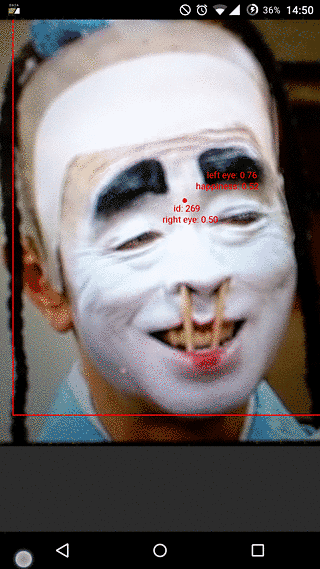
では「笑いながら怒る人」はどうなるか.


20150928-145803

笑顔度 0.96 と判定されました.

声とセリフだけが「怒ってる」んですねこの芸って.