



👉 【Kotlin】Flow の挙動やライフサイクルをログで確認する

以下、良記事の意訳です。
Migrating from LiveData to Kotlin’s Flow | Medium
Medium.com で表示
LiveData は、2017年に必要とされていました。オブザーバーパターンは私たちの生活を楽にしてくれましたが、RxJava などの選択肢は当時の初心者にとって複雑すぎました。Architecture Components チームは、LiveData (Android向けに設計された、非常にこだわりをもったオブザーバ型のデータホルダークラス) を作成しました。これは、簡単に始められるようにシンプルに作られており、より複雑なリアクティブストリームのケースでは、RxJava と統合して使用することが推奨されていました。
Java開発者、初心者、そしてシンプルな状況では、やはり LiveData が最適です。それ以外の人は、Kotlin Flow に移行するのが良いでしょう。Flow はまだ学習曲線が急ですが、Kotlin 言語の一部であり、Jetbrains がサポートしています。また、リアクティブモデルにぴったりの Compose も登場します。
以前から、View と ViewModel 以外のアプリの様々な部分をつなぐために Flow を使うことを話してきました。Android UIから Flow を collect する安全な方法ができたことで、完全な移行ガイドを作成することができます。
この記事では、View に Flow を公開する方法、Flow を collect する方法、そして特定のニーズに合わせて微調整する方法を学びます。
#1 : 可変データホルダーを使用したワンショット
これは典型的なパターンで、コルーチンの結果でステートホルダーを変異させるものです。

class MyViewModel {
  private val _myUiState = MutableStateFlow<Result<UiState>>(Result.Loading)
  val myUiState: StateFlow<Result<UiState>> = _myUiState

  init {
    viewModelScope.launch {
      val result = ...
      _myUiState.value = result
    }
  }
}
StateFlow は、LiveData に最も近い SharedFlow です。
- 常に値を持っています。
- 値は1つしかありません。
- 複数のオブザーバーをサポートしています(それで Flow は shared)。
- アクティブなオブザーバーの数とは関係なく、サブスクリプション時に常に最新の値を返す。
UIの状態を View に公開するときは、StateFlow を使います。これは、UI状態を保持するために設計された安全で効率的なオブザーバーです。
#2 : ワンショット
これは、前のスニペットと同じで、可変型のバッキング・プロパティを持たずに、コルーチン呼び出しの結果を公開するものです。
ステートホルダーは常に値を持っているので、UIの状態を Loading、Success、Error などでサポートする Result クラスなどでラップすることは良いアイデアです。

class MyViewModel(...) : ViewModel() {
  val result: StateFlow<Result<UiState>> = flow {
    emit(repository.fetchItem())
  }.stateIn(
    scope = viewModelScope,
    started = WhileSubscribed(5000),
    initialValue = Result.Loading
  )
}
stateIn は、Flow を StateFlow に変換する Flow 演算子です。 詳細は後ほど説明します。
#3 : パラメータを使用したワンショットデータロード
例えば、ユーザーIDに依存するデータをロードしたい場合、フローを公開している AuthManager からこの情報を取得するとします。

class MyViewModel(authManager..., repository...) : ViewModel() {
  private val userId: Flow<UserId> = authManager.observeUser().map { user -> user.id }

  val result: StateFlow<Result<Item>> = userId.mapLatest { newUserId ->
    repository.fetchItem(newUserId)
  }.stateIn(
    scope = viewModelScope,
    started = WhileSubscribed(5000),
    initialValue = Result.Loading
  )
}
もっと柔軟性が必要な場合は、transformLatest を使用して、アイテムを明示的に emit することもできますのでご注意ください。
val result = userId.transformLatest { newUserId ->
  emit(Result.LoadingData)
  emit(repository.fetchItem(newUserId))
}.stateIn(
  scope = viewModelScope,
  started = WhileSubscribed(5000),
  initialValue = Result.LoadingUser // Note the different Loading states
)
#4 : パラメータを使用してのデータのストリーム監視
では、この例をより反応性の高いものにしてみましょう。データはフェッチするのではなく、監視するので、データのソースの変更を自動的にUIに伝播させます。
例では、データソースで fetchItem を呼び出す代わりに、Flow を返す observeItem を使用します。
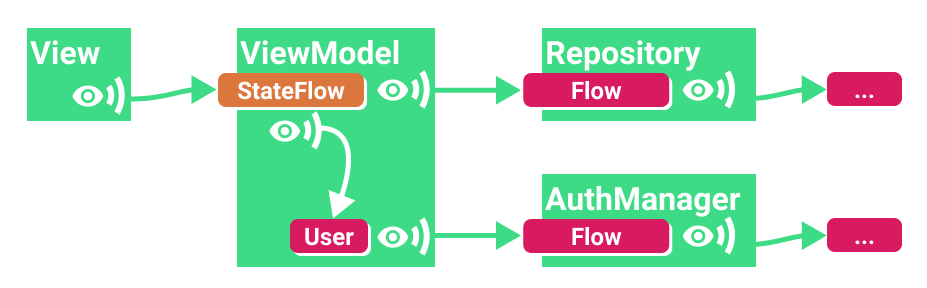
class MyViewModel(authManager..., repository...) : ViewModel() {
  private val userId: Flow<String?> =
    authManager.observeUser().map { user -> user?.id }

  val result: StateFlow<Result<Item>> = userId.flatMapLatest { newUserId ->
    repository.observeItem(newUserId)
  }.stateIn(
    scope = viewModelScope,
    started = WhileSubscribed(5000),
    initialValue = Result.LoadingUser
  )
}
公開された StateFlow は、ユーザーが変更されたり、リポジトリ内のユーザーのデータが変更されたりするたびに更新を受け取ります。
#5 : 複数のソースを組み合わせる : MediatorLiveData -> Flow.combine
1つまたは複数の更新ソースを観察し、新しいデータを取得したときに何かを行うことができます。
val flow1: Flow<Int> = ...
val flow2: Flow<Int> = ...

val result = combine(flow1, flow2) { a, b -> a + b }
conbineTransform や zip 関数も同様に利用することができます。
■ 公開する StateFlow を設定する (stateIn 演算子)
最初に stateIn を使って通常の Flow を StateFlow に変換しましたが、これにはいくつかの設定が必要です。今すぐに詳細な設定をせず、コピペで済ませたい人には以下の組み合わせがおすすめです。
val result: StateFlow<Result<UiState>> = someFlow
  .stateIn(
     scope = viewModelScope,
     started = WhileSubscribed(5000),
     initialValue = Result.Loading
   )
しかし、その一見ランダムな5秒間の開始パラメータがよくわからないという方は、ぜひ読んでみてください。
stateIn には3つのパラメータがあります(docsより)。
@param scope 共有が開始されるコルーチンのスコープ。
@param started 共有の開始と停止を制御する戦略。
@param initialValue ステートフローの初期値。
この値は SharingStarted.WhileSubscribed で replayExpirationMillis パラメータを指定して StateFlow をリセットしたときにも使用されます。
started には3つの値があります。
Lazily : 最初のサブスクライバが現れたときに開始し、スコープがキャンセルされたときに停止します。
Eagerly : すぐに開始し、スコープがキャンセルされたら停止する。
WhileSubscribed : (複雑なので次で説明します。)
ワンショットの場合は Lazily か Eagerly を使います。しかし、Flow を監視している場合は WhileSubscribed を使って、以下に説明するような小さくても重要な最適化を行うべきです。
■ WhileSubscribed
WhileSubscribed は、collector がない場合に上流の Flow をキャンセルします。stateIn を使って作成された StateFlow は View にデータを公開していますが、同時に他のレイヤーや上流からの Flow も監視しています。これらの Flow をアクティブにしておくと、例えば、データベース接続やハードウェアセンサーなどの他のソースからデータを読み込み続ける場合、リソースの無駄遣いにつながる可能性があります。アプリがバックグラウンドに移行する際には、これらのコルーチンを停止する必要があります。
WhileSubscribed は2つのパラメータを取ります。
public fun WhileSubscribed(
  stopTimeoutMillis: Long = 0,
  replayExpirationMillis: Long = Long.MAX_VALUE
)
* Stop timeout
stopTimeoutMillis は、最後の加入者がいなくなってから、上流の Flow が停止するまでの遅延時間(ミリ秒)を設定します。デフォルトはゼロ(直ちに停止)です。
これは、View がほんの数秒リスニングを停止したときに、上流の Flow をキャンセルしたくない場合に便利です。このようなことはよくあります。例えば、ユーザーがデバイスを回転させたときに、View が destroy され、すぐに再作成されるような場合です。
liveData ビルダーでの解決策は、サブスクライバーが存在しない場合にコルーチンを停止する5秒の delay を追加することでした。WhileSubscribed(5000) はまさにそれを行います。
class MyViewModel(...) : ViewModel() {
  val result = userId.mapLatest { newUserId ->
    repository.observeItem(newUserId)
  }.stateIn(
    scope = viewModelScope,
    started = WhileSubscribed(5000),
    initialValue = Result.Loading
  )
}
この方法は、以下、すべての条件を満たしています。
- ユーザーがアプリをバックグラウンドに送ると、他のレイヤーからの更新が5秒後に停止し、バッテリーを節約できます。
- 最新の値はまだキャッシュされているので、ユーザーが戻ってきたときには、View にはすぐに何らかのデータが表示されることになります。
- サブスクリプションが再開されると、新しい値が入ってきて、利用可能な場合は画面が更新されます。
* Replay expiration
ユーザーが長時間離れているときに古いデータを表示したくなく、ローディング画面を表示したい場合は、WhileSubscribed の replayExpirationMillis パラメータをチェックしてください。キャッシュされた値が stateIn で定義された初期値に復元されるため、この状況では非常に便利で、メモリも節約できます。アプリに戻ってきたときの動作は遅くなりますが、古いデータは表示されません。
replayExpirationMillis - 共有コルーチンの停止とリプレイキャッシュのリセット( shareIn 演算子の場合はキャッシュを空にし、stateIn 演算子の場合はキャッシュされた値を元の初期値にリセットする)の間の遅延時間(ミリ秒)を設定します。デフォルトは Long.MAX_VALUE です(リプレイキャッシュを永遠に保持し、バッファをリセットしない)。ゼロの値を使用すると、キャッシュは直ちに失効します。
👉 【Kotlin】Flow の挙動やライフサイクルをログで確認する
■ View から StateFlow を監視する
これまで見てきたように、View が ViewModel の StateFlow に、もう監視していないことを知らせることは非常に重要です。しかし、ライフサイクルに関連するすべてのことがそうであるように、それはそれほど単純なことではありません。
Flow を collect するためにはコルーチンが必要ですが Activity や Fragment にはコルーチンビルダーがたくさんあります。
- Activity.lifecycleScope.launch:コルーチンを直ちに開始し、アクティビティが destroy されたときにそれをキャンセルする。
- Fragment.lifecycleScope.launch:コルーチンを直ちに開始し、フラグメントが destoroy されたときにキャンセルします。
- Fragment.viewLifecycleOwner
.lifecycleScope.launch:コルーチンを直ちに開始し、フラグメントの View ライフサイクルが destroy されたときにキャンセルします。UIを変更する場合は、ビューライフサイクルを使用する必要があります。
■ LaunchWhenStarted, launchWhenResumed…
特殊な launch である launchWhenX は、lifecycleOwner が X の状態になるまで待ち、lifecycleOwner が X の状態を下回ったときにコルーチンを中断します。注意すべき点は、ライフサイクル・オーナーが破壊されるまでコルーチンをキャンセルしないことです。

アプリがバックグラウンドで動作しているときに更新情報を受信すると、クラッシュする可能性がありますが、これはビューでの collect を中断することで解決します。しかし、アプリがバックグラウンドで動作している間、上流の Flow はアクティブに保たれるため、リソースが無駄になる可能性があります。
つまり、これまで StateFlow を設定するために行ってきたことがすべて無駄になってしまうのです。しかし、これには新しい API があります。
■ lifecycle.repeatOnLifecycle を活用する
この新しいコルーチンビルダー(lifecycle-runtime-ktx 2.4.0-alpha01から入手可能)は、私たちが必要としていることを正確に実行します:コルーチンを特定の状態で開始し、ライフサイクルオーナーがそれ以下になると停止します。

たとえば、フラグメントの場合:
onCreateView(...) {
  viewLifecycleOwner.lifecycleScope.launch {
    viewLifecycleOwner.lifecycle.repeatOnLifecycle(STARTED) {
      myViewModel.myUiState.collect { ... }
    }
  }
}
これは、Fragment のビューが STARTED になったときに収集を開始し、RESUMED まで継続し、STOPPED に戻ったときに停止します。
詳しくは、A safer way to collect flow from Android UI をご覧ください。
repeatOnLifecycle APIと上記の StateFlow ガイダンスを混ぜ合わせることで、デバイスのリソースを有効活用しながら最高のパフォーマンスを得ることができます。

注意:
データバインディングに最近追加された StateFlow のサポートでは、更新情報の収集に launchWhenCreated を使用していますが、安定版では代わりにrepeatOnLifecycle を使用するようになります。
データバインディングでは、あらゆる場所で Flow を使用し asLiveData() を追加するだけで View に公開することができます。データバインディングは lifecycle-runtime-ktx 2.4.0 が安定した時点で更新される予定です。
■ まとめ
ViewModel からデータを公開し、View で監視する方法:
⭕ WhileSubscribed を使って、タイムアウト付きの StateFlow を公開します。
⭕ repeatOnLifecycle を使って collect します。
これ以外の組み合わせでは、上流側の Flow がアクティブになり、リソースが無駄になります。
❌ WhileSubscribed を使って公開し、lifecycleScope.launch/launchWhenX で collect する。
❌ Lazily/Eagerlyを使って公開し、repeatOnLifecycle で collect する。
もちろん、Flow のフルパワーを必要としない場合は LiveData を使えばいいのです。
👉 StateFlow は distinctUtilChanged 不要
👉 StateFlow の View への公開
👉 【MVVM】Flow vs LiveData
👉 【Kotlin】SharedFlow と BroadcastChannel


MVVM で Hilt のパターン化 💉 https://t.co/MbXMQijPzw #android #プログラミング初心者 #kotlin
— chanzmao (@maochanz) March 16, 2022


