highlight.js に「AndroidStudio」スタイルが登場してた件

WEBサイトでコードをシンタックス・ハイライトするなら「highlight.js」がおすすめです。

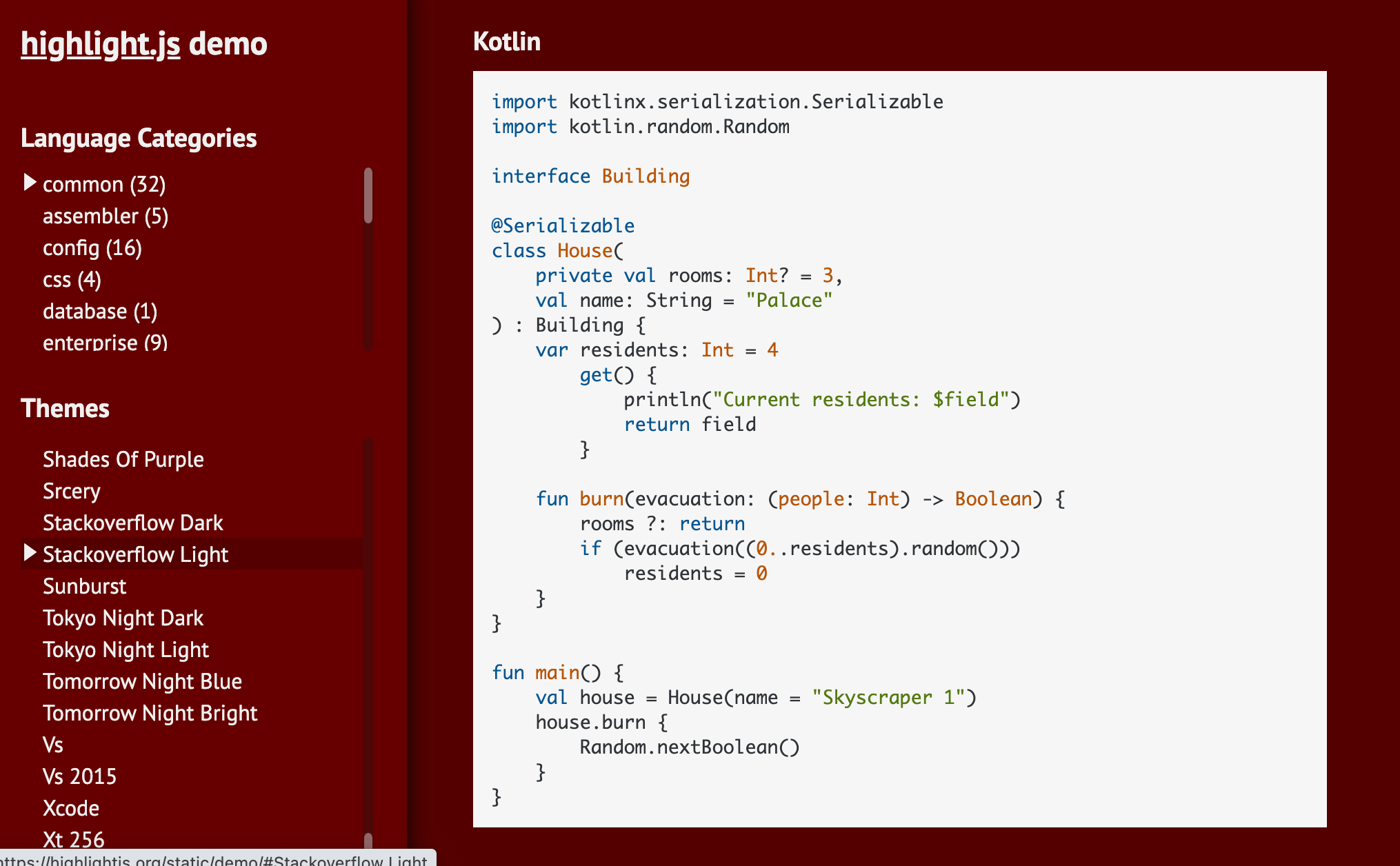
highlight.js Android Studio style

👉 highlight.js 

「スタイル」と呼ばれるきれいなテーマが今では 246個 もあるようです。

Androidアプリ向けIDE「AndroidStudio」というスタイルも登場していました。

ダークなほうの「Darcula」ですね、これ。

highlight.js Android Studio style

その他、いくつかメジャーどころを貼っておきます。

github

github-dark

github-dark-dimmed

stackoverflow-light

stackoverflow-dark

使い方

HTMLヘッダーの中に表示したいスタイル「androidstudio」のCSSファイルと、プログラミング言語を認識するJavaScriptファイルについて記述しておきます。


<link rel="stylesheet" href="/path/to/styles/androidstudio.min.css">
<script src="/path/to/highlight.min.js"></script>
<script>hljs.highlightAll();</script>

<pre><code class="language-kotlin"> ~ </code></pre> 内にコードを差し込みます。

言語はここで指定しなくても自動検出してくれるようですが、短いコードなどもあるので、念のため記述しておいたほうが良いでしょう。

実体参照にエスケープしたコードを以下のように差し込み貼り付けます。


<pre><code class="language-kotlin">
import kotlinx.serialization.Serializable
import kotlin.random.Random

interface Building

@Serializable
class House(
    private val rooms: Int? = 3,
    val name: String = &quot;Palace&quot;
) : Building {
    var residents: Int = 4
        get() {
            println(&quot;Current residents: $field&quot;)
            return field
        }

    fun burn(evacuation: (people: Int) -&gt; Boolean) {
        rooms ?: return
        if (evacuation((0..residents).random()))
            residents = 0
    }
}

fun main() {
    val house = House(name = &quot;Skyscraper 1&quot;)
    house.burn {
        Random.nextBoolean()
    }
}

</code></pre>

👉 【macOS】コピーしているテキストをHTMLエスケープする 

ブラウザでアクセスすると以下のように表示されています。


import kotlinx.serialization.Serializable
import kotlin.random.Random

interface Building

@Serializable
class House(
    private val rooms: Int? = 3,
    val name: String = "Palace"
) : Building {
    var residents: Int = 4
        get() {
            println("Current residents: $field")
            return field
        }

    fun burn(evacuation: (people: Int) -> Boolean) {
        rooms ?: return
        if (evacuation((0..residents).random()))
            residents = 0
    }
}

fun main() {
    val house = House(name = "Skyscraper 1")
    house.burn {
        Random.nextBoolean()
    }
}

👉 How to use highlight.js 

このサイトでも使っていましたが6年ぶりに更新してみましたので 🙆


【Retorofit】コピペで使える NetworkModule【Dagger Hilt】

もうこれはテンプレ化しておきます。

Retrofit の話が中心となります。

👉 Retrofit 


Converter

Retrofit-Converters

JSON 形式のレスポンスをパースして変換するのは、Gson か Moshi が人気のように思います。


var retrofit = Retrofit.Builder()
  .baseUrl("https://api.example.com")
  .addConverterFactory(GsonConverterFactory.create())
  .build()


var retrofit = Retrofit.Builder()
  .baseUrl("https://api.example.com")
  .addConverterFactory(MoshiConverterFactory.create())
  .build()

👉 retrofit/retrofit-converters at master · square/retrofit 

今回は、Kotlin Serialization を利用した「Kotlin Serialization Converter」を使います。

ExperimentalSerializationApi なのですがね。


val contentType = "application/json".toMediaType()
val retrofit = Retrofit.Builder()
    .baseUrl("https://example.com/")
    .addConverterFactory(Json.asConverterFactory(contentType))
    .build()

👉 JakeWharton/retrofit2-kotlinx-serialization-converter: A Retrofit 2 Converter.Factory for Kotlin serialization. 


Call Adapter

Retrofit CallAdapters

通信の非同期処理はどれに任せるか。


var retrofit = Retrofit.Builder()
  .baseUrl("https://api.example.com")
  .addCallAdapterFactory(RxJavaCallAdapterFactory.create())
  .build()

👉 retrofit/retrofit-adapters at master · square/retrofit 

Coroutine を使った Jake製の「Kotlin Coroutine Adapter」は 今では DEPRECATED。

👉 JakeWharton/retrofit2-kotlin-coroutines-adapter: A Retrofit 2 adapter for Kotlin coroutine's Deferred type. 

Retrofit は 2.6.0+ で、内部に suspend function をサポートしてるので、特に、.addCallAdapterFactory() を使わなくてもよい。


@GET("users/{id}")
suspend fun user(@Path("id") id: Long): User

👉 retrofit/CHANGELOG.md at master · square/retrofit 


HttpLoggingInterceptor

OkHttpClient に HTTP関連のログを吐かせます。


--> POST /greeting http/1.1
Host: example.com
Content-Type: plain/text
Content-Length: 3

Hi?
--> END POST

<-- 200 OK (22ms)
Content-Type: plain/text
Content-Length: 6

Hello!
<-- END HTTP

👉 HttpLoggingInterceptor.Level (OkHttp Logging Interceptor 3.14.0 API) 


val logging = HttpLoggingInterceptor()
logging.setLevel(Level.BASIC)
val client = OkHttpClient.Builder()
  .addInterceptor(logging)
  .build()

👉 okhttp/okhttp-logging-interceptor at master · square/okhttp 


まとめ

Dagger の Module にしておきます。

テンプレート化してください、と言わんばかりに

よく似たものをあちこちで見かけますよね。

見通しも良くなります。

コピペでどうぞ。

(おわり)


DefaultLifecycleObserver や LifecycleEventObserver の使い方

あら。

DefaultLifecycleObserver や LifecycleEventObserver の使い方

Annotation that can be used to mark methods on LifecycleObserver implementations that should be invoked to handle lifecycle events.

Deprecated
This annotation required the usage of code generation or reflection, which should be avoided. Use DefaultLifecycleObserver or LifecycleEventObserver instead.

いつのまにか deprecated。

言われる通りに代わりのやつらを使います。

👉 DefaultLifecycleObserver  |  Android Developers 

👉 LifecycleEventObserver  |  Android Developers 

昔のコードを久々に開くといろいろな新しい発見があります。

👉 android - Do I need to call removeObserver for lifecycle, upon its onDestroy() event? - Stack Overflow 
👉 JakeWharton/timber: A logger with a small, extensible API which provides utility on top of Android's normal Log class. 


Error: ComponentProcessingStep was unable to process 'AppApplication_HiltComponents.SingletonC' because 'DefaultActivityViewModelFactory' could not be resolved.

Releases dagger-2.34
Dagger2.34 にアップデートしたら全くビルドが通らず。

Error: ComponentProcessingStep was unable to process 'com.example.eg.AppApplication_HiltComponents.SingletonC' because 'dagger.hilt.android.internal.lifecycle.DefaultActivityViewModelFactory' could not be resolved.

なんすかねこれ。


androidx.hilt:hilt-lifecycle-viewmodel が不要

Hmm, the androidx.hilt:hilt-lifecycle-viewmodel artifacts were deprecated in the Dagger 2.34 release in favor of native Hilt API. The missing DefaultActivityViewModelFactory class is no longer in the Hilt codebase.

You should be able to fix this using the instructions in the 2.34 release notes to upgrade to the new HiltViewModel API.

androidx.hilt:hilt-lifecycle-viewmodel アーティファクトはDagger 2.34リリースで非推奨となり、ネイティブHilt APIに切り替わりました。

👉 ComponentProcessingStep was unable to process '*Application_HiltComponents.SingletonC' · Issue #3257 · google/dagger

New breaking changes
The alpha androidx extension @ViewModelInject is no longer supported. @ViewModelInject has been deprecated since androidx.hilt 1.0.0-alpha03 and was removed in androidx.hilt 1.0.0-beta01. Hilt now falls back to the base activity/fragment default ViewModelProviderFactory (3778ee2)

Migration steps:
Users of @ViewModelInject can migrate to @HiltViewModel which was added in Dagger 2.31.

1. Add @HiltViewModel annotation to the class
2. Replace the @ViewModelInject annotation on the constructor with @Inject.
3. Remove @Assisted from the SavedStateHandle constructor parameter, if it exists
4. Remove the old androidx.hilt:hilt-lifecycle-viewmodel dependency from your build.gradle file

👉 Release Dagger 2.34 · google/dagger 

私の場合は、上記の手順を確認して build.gradle を修正でビルド通るようになりました。削除漏れです。

androidx.hilt:hilt-lifecycle-viewmodel artifacts were deprecated in the Dagger 2.34 release in favor of native Hilt API.

build ファイルの削除漏れが影響を及ぼすことが結構多くなりました、最近。


Play ストアから現在公開中のバージョンを取得する


アプリの更新を早く知りたいですよね!

現在公開されているバージョンを取得したいですよね!

HTMLに依存するのもアレなのですが、

やってみました。

jq にインスパイアされて作ったという

pup というのを使わせていただきました、便利です。

👉 ericchiang/pup: Parsing HTML at the command line 


~ % brew install pup

でフツーにいけますし。

そして、Playストア画面の下の方を目指してスクレイピングします。

fetch version name from google play store

いつものように curl -s から |(パイプ) でつないでパースします。

簡単にワンライナーで取得できます。

https://play.google.com/store/apps/details?id=com.ss.android.ugc.trill

弱点としましては、端末を広く細かく網羅してるアプリに対しては、

👉 Twitter - Apps on Google Play 

こうなる。

https://play.google.com/store/apps/details?id=com.twitter.android

https://play.google.com/store/apps/details?id=com.twitter.android

まあ、しかたないか。

おまけ

👉 macOS でスクリプトから通知を出す。 
👉 Google Play Console - Google Play のアプリ 
👉 【Playストア】今現在のアプリ更新時の審査日数を調べる方法