「Preview」ということですが.


とりあえずは動く.




「Preview」ということですが.
とりあえずは動く.
外からでなく端末内からみる.

anmap - Google Project Hosting
端末内にて.
$ tar xvf nmap-5.51-1.tar
tar: invalid tar magic
ん?
$ md5 nmap-5.51-1.tar
ed692f7ea2e217ca71ae1103f5bf3819  nmap-5.51-1.tar
$ ls -al $(which tar)
lrwxr-xr-x root     shell             2015-10-07 13:51 tar -> busybox
$ busybox
BusyBox v1.22.1 bionic (2015-10-06 21:51 -0700) multi-call binary.
…
新しいものに変える.
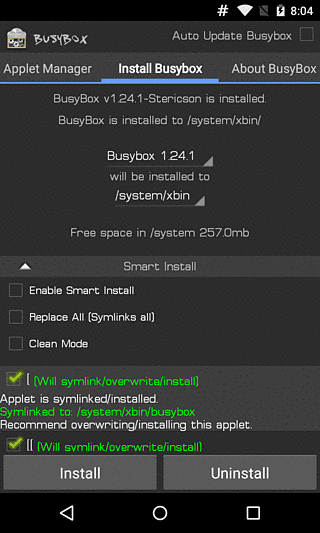
BusyBox - Google Play の Android アプリ
$ busybox
BusyBox v1.24.1-Stericson (2015-11-06 19:11:24 EST) multi-call binary.
…

$ tar xvf nmap-5.51-1.tar
nmap
nmap-os-db
nmap-payloads
nmap-protocols
nmap-rpc
nmap-service-probes
nmap-services
$ ./nmap
/system/bin/sh: ./nmap: can't execute: Permission denied
$ su
# chmod +x nmap
Bad mode
# chmod 777 nmap
# ./nmap
sh: ./nmap: can't execute: Permission denied
ん?
# ls -al nmap
-rw-rw---- root     sdcard_r  1907224 2015-11-14 07:45 nmap
# cp nmap* /data/local/tmp
# cd /data/local/tmp
# ls
nmap
nmap-5.51-1.tar
nmap-os-db
nmap-payloads
nmap-protocols
nmap-rpc
nmap-service-probes
nmap-services

# chmod 777 nmap
# ls -al nmap
-rwxrwxrwx root     root      1907224 2015-11-14 07:48 nmap
# ./nmap 127.0.0.1

Starting Nmap 5.51 ( http://nmap.org ) at 2015-11-13 22:53 UTC
Nmap scan report for localhost (127.0.0.1)
Host is up (0.00011s latency).
All 1000 scanned ports on localhost (127.0.0.1) are closed

Nmap done: 1 IP address (1 host up) scanned in 0.64 seconds
ネットワークADB向けをあける.

# ./nmap 127.0.0.1

Starting Nmap 5.51 ( http://nmap.org ) at 2015-11-13 22:56 UTC
Nmap scan report for localhost (127.0.0.1)
Host is up (0.00012s latency).
Not shown: 999 closed ports
PORT     STATE SERVICE
5555/tcp open  freeciv

Nmap done: 1 IP address (1 host up) scanned in 0.57 seconds
MaterialDesign な ActionBar に実装されているメニューアイコンを長押ししたら表示される 吹き出しチックな Toast.
これ.

例えば, レイアウトがこんな感じであるとして,
...
<TextView
    android:id="@+id/text"
    android:layout_width="wrap_content"
    android:layout_height="wrap_content"
    android:longClickable="true"
    android:text="Hello World!"
    android:contentDescription="コンニチハ セカイ!!"
    />
...
<android.support.design.widget.FloatingActionButton
    android:id="@+id/fab"
    android:layout_width="wrap_content"
    android:layout_height="wrap_content"
    android:layout_gravity="bottom|end"
    android:layout_margin="@dimen/fab_margin"
    android:src="@android:drawable/ic_dialog_email"/>
...
リスナーと表示するテキストは以下のようにシンプルにセットするのみ.
...
TextView text = (TextView)findViewById(R.id.text);
FloatingActionButton fab = (FloatingActionButton) findViewById(R.id.fab);

CheatSheet.setup(text);
CheatSheet.setup(fab, "メールボタンを長押ししました!!");
...
それぞれ長押しで表示.


これ.
Android helper class for showing cheat sheets (tooltips) for icon-only UI elements on long-press. This is already default platform behavior for icon-only action bar items and tabs. This class provides this behavior for any other such UI element.
https://gist.github.com/romannurik/3982005
ポータブルにリスナー設置や適切なToast位置の指定や上下の振り分けができます.